


StarTech mSATA to 2.5 SATA SSD Enclosure
Couldn't load pickup availability
StarTech.com mSATA to 2.5-Inch SATA SSD Adapter Enclosure – SATA III | Silver & Black (New)
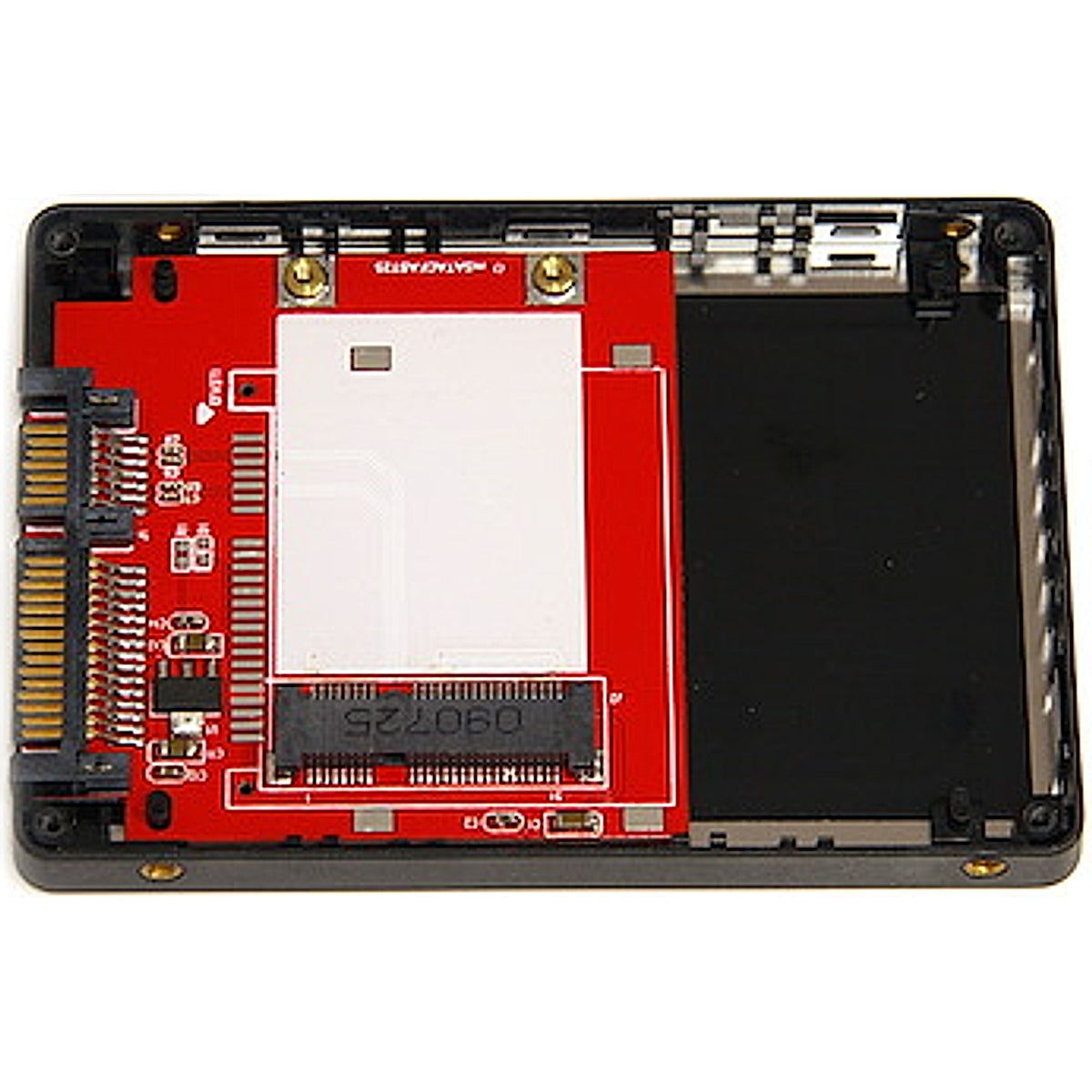
Convert a compatible full-size mSATA SSD into a standard 2.5-inch SATA drive with the StarTech.com SAT2MSAT25 Adapter Enclosure. This practical converter allows an mSATA drive to be installed in many laptops, desktop computers, external drive enclosures and SATA docking stations designed for conventional 2.5-inch storage devices.
The adapter uses a direct SATA pass-through design, allowing the installed mSATA SSD to communicate with the host system without unnecessary interface conversion. It supports SATA I, SATA II and SATA III connections with theoretical interface speeds of up to 6Gbps.
Its enclosed 2.5-inch housing helps protect the installed SSD and provides standard mounting points for installation in compatible drive bays. The aluminium and plastic construction offers a lightweight and durable solution for reusing or installing an mSATA drive.
Key Features
💾 mSATA SSD Conversion – Converts a compatible mSATA SSD into a standard 2.5-inch SATA drive
⚡ SATA III Support – Supports theoretical interface speeds of up to 6Gbps
🔄 Direct Pass-Through Design – Avoids unnecessary data-conversion bottlenecks
📏 Standard 2.5-Inch Format – Fits many compatible laptop and desktop drive bays
🔌 Standard SATA Connection – Uses conventional SATA data and power connectors
🛡️ Protective Enclosure – Helps protect the installed mSATA drive during use
🔩 Standard Mounting Points – Suitable for compatible computer bays, enclosures and docks
🧰 Simple Installation – Secure the mSATA SSD inside the housing using the supplied hardware
♻️ Reuse Existing Storage – Converts a spare mSATA drive for use in another compatible system
🔇 Silent Operation – Uses a solid-state drive with no moving mechanical parts
Specifications
Brand: StarTech.com
Product Name: 2.5-Inch SATA to Mini SATA SSD Adapter Enclosure
Model / Part Number: SAT2MSAT25
Product Type: Internal SSD Adapter Enclosure
Supported Drive Type: Full-Size mSATA SSD
Number of Supported Drives: One
Internal Interface: mSATA / Mini SATA
External Host Interface: Standard 2.5-Inch SATA
SATA Support: SATA I, SATA II and SATA III
Maximum Interface Speed: Up to 6Gbps
Data Transfer Method: Direct SATA Pass-Through
Form Factor: 2.5 Inches
Housing Material: Aluminium and Plastic
Standard Mounting Points: Yes
Power Source: Supplied Through the SATA Power Connector
External Power Adaptor Required: No
Operating Temperature: Approximately 0°C to 50°C
Storage Temperature: Approximately −10°C to 85°C
Dimensions: Approximately 99 × 71 × 7.6mm
Weight: Approximately 51g
Colour: Silver and Black
Functions: mSATA Conversion, Internal Storage Installation and Drive Reuse
NVMe Compatibility: No
M.2 SATA Compatibility: No
2.5-Inch SSD Included: No
mSATA SSD Included: No
Manufacturer Warranty: Two-Year Limited Warranty
Condition
New
✅ Brand New
✅ Genuine StarTech.com Product
✅ Protective 2.5-Inch Housing
✅ SATA III Compatible
✅ Ready for mSATA SSD Installation
What’s Included
1 × StarTech.com SAT2MSAT25 mSATA to 2.5-Inch SATA SSD Adapter Enclosure
2 × Mounting Screws
1 × Instruction Manual
The mSATA SSD and storage capacity are not included.
Perfect For
💻 Laptop Repairs – Install a compatible mSATA SSD in a supported 2.5-inch SATA bay
🖥️ Desktop Computers – Use an mSATA drive through a standard SATA connection
♻️ Reusing Spare SSDs – Convert an unused mSATA drive into a 2.5-inch format
🔧 Computer Upgrades – Replace a compatible mechanical hard drive with an mSATA SSD
📦 External Drive Enclosures – Install in compatible 2.5-inch SATA enclosures
🗄️ SATA Docking Stations – Use an mSATA drive in a compatible drive dock
🛠️ Repair Workshops – Test, access or repurpose compatible mSATA storage drives
Safety Information
⚠️ This adapter supports full-size mSATA SSDs only. It does not support M.2 NVMe or M.2 SATA drives.
⚠️ Confirm that the computer or enclosure supports a standard 2.5-inch SATA drive before installation.
🔌 Switch off and disconnect the computer from power before installing the adapter.
⚡ Use suitable anti-static precautions when handling the exposed SSD and adapter board.
🪛 Secure the SSD and enclosure correctly without overtightening the screws.
💾 Back up important files before formatting, cloning or repartitioning the installed drive.
- Express Delivery
- 6 Months Warranty
- 7 Days Easy Replace